About

Full-stack software developer with 4+ years of AI / Machine Learning development experience (since 2022) focused on AI / Large Language Model (LLM) applications and the production web stack. Frontend in React, Next.js, Vue, TypeScript, and Tailwind; backend in Python (FastAPI), Node.js, SQLite / PostgreSQL, Cloudflare Workers, and self-hosted Linux services. Hands-on across the modern AI stack: LLM Fine-Tuning with LoRA on multi-GPU clusters (Hugging Face Accelerate + Fully Sharded Data Parallel — FSDP), Transformer architecture and from-scratch model implementation, self-hosted Vision-Language Models (multimodal text + image AI), OpenAI-compatible model serving, Retrieval-Augmented Generation (RAG) backed by knowledge bases and vector databases, Multi-Agent Systems and AI-agent orchestration, Model Context Protocol (MCP) servers, and prompt engineering. Deep Learning and Computer Vision: Convolutional Neural Networks (CNN), real-time object detection (YOLO), medical-imaging segmentation (nnU-Net), and Reinforcement Learning — implemented from scratch in NumPy and at scale in PyTorch. Track record: 39 shipped side projects spanning end-to-end AI applications, distributed systems, and developer tooling; co-authored a peer-reviewed research paper published in SPIE Proceedings Vol. 12285 (DOI 10.1117/12.2637187) on hybrid signal-processing + neural-network temperature forecasting; Kaggle Silver Medal on the SIIM-FISABIO-RSNA COVID-19 chest X-ray detection competition (top tier among thousands of teams worldwide).

Experience

Enterprise Risk Management — Software Engineer Intern (Part-time, continued from full-time internship)

Bank of China

2026-01 — 2026-04

New York, NY

  • Continued work on the same risk-management tool, moving it from a test environment to live production use by the team.
  • Adjusted the application so it could read and write the bank's existing internal databases instead of the prototype data store.

Enterprise Risk Management — Software Engineer Intern (Full-time)

Bank of China

2025-07 — 2025-08

New York, NY

  • Built the user-facing screens of an internal tool the bank's risk team uses to record and review enterprise-risk events.
  • Set up the login flow so that only authorized employees can sign in and access the data.
  • Connected the screens to a cloud database so risk officers can add, edit, and view records, with updates appearing live for everyone on the team.

GitHub Contributions

Projects

Extensible API Platform and Control Plane (Project Hail Mary)

2026
  • Distributed Systems
  • Microservices
  • CI/CD
  • OAuth

A self-hosted personal cloud platform that runs my résumé site, blog, and several side-project APIs from one domain (api.lishuyu.app). My original 2023 platform had grown into a tangled monolith — every new endpoint touched most of the codebase, and a single bug could take everything offline, so in early 2026 I rebuilt it from scratch as a modular Distributed Systems control plane. I designed and wrote four independent Python services (a service catalog, an OAuth login service, an automatic deployer, and a small client SDK), stood up a fresh Linux production server with bootstrap scripts, and migrated content over from the old platform. It is built on simple, well-understood infrastructure — Linux + systemd (Linux system-service manager) for processes, Caddy (auto-HTTPS web server) for TLS, SQLite per service for storage, and continuous off-site cloud backup — instead of heavy container orchestration. End users are myself plus anyone consuming the public APIs (e.g. the live résumé front-end and Generative AI / Large Language Model (LLM) demos that call into it). Live since April 2026: pushing to GitHub triggers an automatic deploy in under a minute, GitHub OAuth and personal access tokens handle login, and a per-service permission engine controls writes. Invocation for callers is plain HTTP against api.lishuyu.app/<service>/.

  • Distributed Systems control plane: four independent Python microservices (catalog, OAuth login, auto-deployer, SDK) replacing a monolithic 2023 codebase.
  • Continuous deployment from GitHub push to live in under one minute via a custom auto-deployer; GitHub OAuth + personal access tokens for auth.
  • Fault-isolated by design — each service has its own SQLite store, so a crash in one cannot take down the others; continuous off-site cloud backup.
  • Production stack: Linux + systemd, Caddy reverse proxy with auto-HTTPS, per-service rule-based authorization engine.
  • Hosts the live résumé API consumed by Generative AI demos and front-end apps — drop-in HTTPS endpoints at api.lishuyu.app/<service>/.

Memoo — Personal Claude-Powered Agent Bot

2026
  • Multi-Agent
  • Generative AI
  • Sandboxed Execution
  • RAG Memory

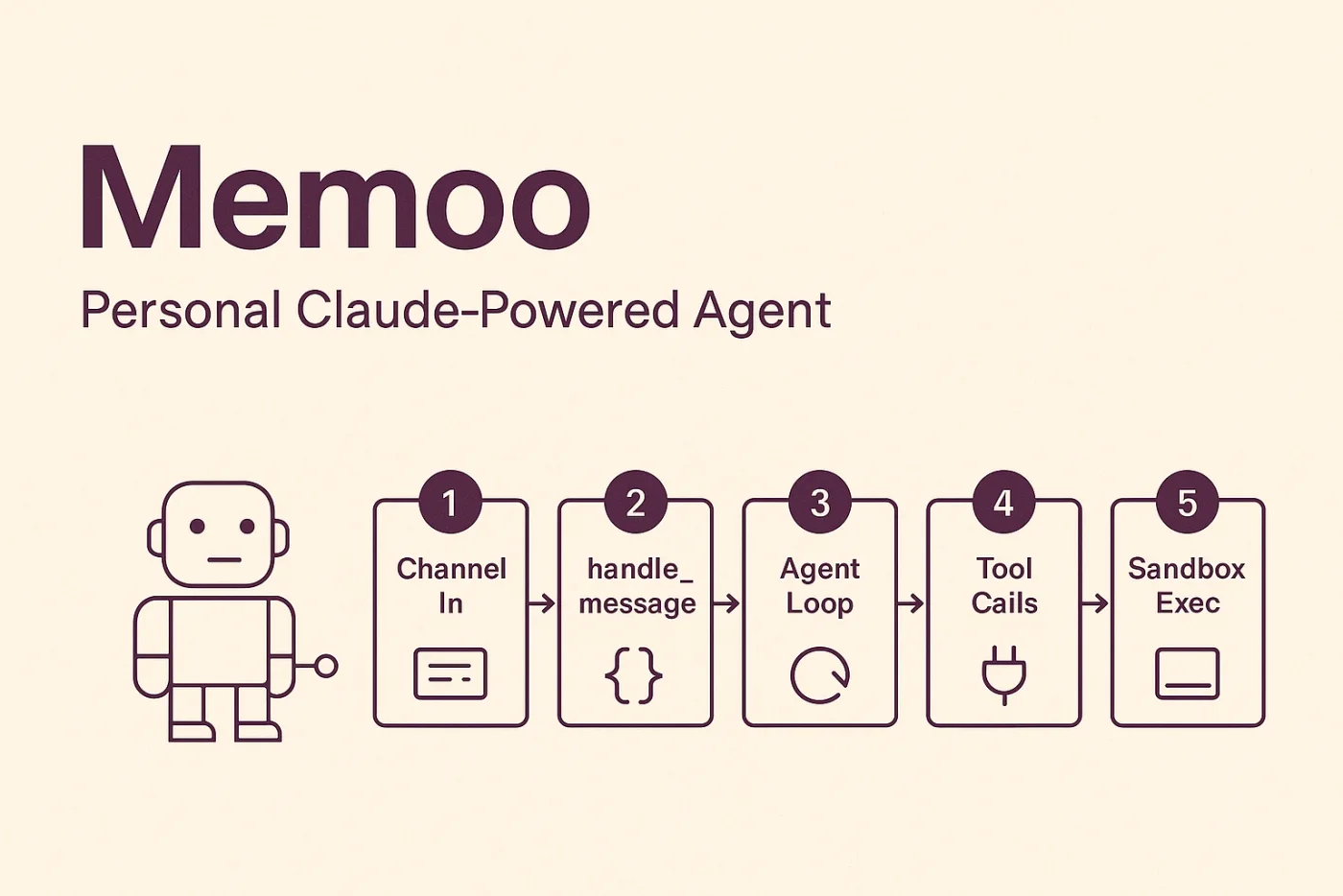
A personal AI agent bot built on the Anthropic Claude API tool-use loop, with sandboxed code execution, hybrid retrieval memory, scheduled 'dream cycle' memory consolidation, and multi-channel messaging. Pain point: I wanted a personal Multi-Agent assistant I could chat with from anywhere, that remembered prior context, could run code safely, and didn't burn tokens consolidating memory in real time. End user is me as the operator across Telegram, WeChat, and a TUI; the open-source repo is on GitHub. Built in Python around an async agentic loop with parallel tool dispatch and per-provider model fallback (Anthropic Claude primary, OpenAI fallback). Per-session OS-level sandboxing: macOS sandbox-exec (sandbox-exec — macOS process sandbox) with custom SBPL (SBPL — Sandbox Profile Language) profiles, or Linux bubblewrap (bubblewrap — Linux process sandbox using kernel namespaces) with namespace isolation, so user-supplied Python and shell never escape into my host. Memory is hybrid Retrieval-Augmented Generation (RAG — feeding documents into an LLM at query time) over SQLite + FTS5 (SQLite FTS5 — full-text search index built into SQLite). Periodic 'dream cycles' batch-consolidate memory through the Anthropic Batch API (Anthropic Batch API — 50%-off async LLM inference). Sub-agent spawning supports depth limits and per-agent context modes; a cron scheduler with SQLite persistence runs scheduled jobs. Improvement delivered: a Generative AI / Multi-Agent personal assistant with persistent memory at half the consolidation cost. How to use: connect via Telegram, WeChat, or the bundled TUI — same agent, same memory, different surfaces.

Memoo — personal Claude-powered agent with sandbox, RAG, multi-channel
  • Multi-Agent personal Generative AI bot on the Anthropic Claude API tool-use loop with parallel tool dispatch and per-provider fallback (Anthropic primary, OpenAI fallback).
  • Per-session OS-level sandbox: macOS sandbox-exec (macOS process sandbox) with custom SBPL (Sandbox Profile Language) profiles or Linux bubblewrap (Linux process sandbox using kernel namespaces) with namespace isolation.
  • Hybrid RAG (Retrieval-Augmented Generation — feeding documents into an LLM at query time) memory over SQLite + FTS5 (full-text search built into SQLite).
  • Dream-cycle memory consolidation through the Anthropic Batch API (Batch API — 50%-off async LLM inference) — half the consolidation cost.
  • Sub-agent spawning with depth limits + per-agent context modes; cron scheduler with SQLite persistence; multi-channel front-end (Telegram, WeChat, TUI).

Short-Term Temperature Prediction (Co-Authored Research Paper)

2022
  • Time-Series Forecasting
  • Neural Networks
  • Signal Processing
  • SPIE Paper

A peer-reviewed research project from high school exploring whether combining classical signal-processing with a Neural Network would beat either approach alone for short-term temperature forecasting. Pain point: pure neural-network forecasters struggle with noisy real-world time-series, and pure decomposition methods can't model nonlinear patterns — but the right hybrid might do both. End users were the research community at SPIE — the project ended up published as a peer-reviewed paper. We built a hybrid Deep Learning pipeline that first decomposed the temperature signal with CEEMDAN (CEEMDAN — Complete Ensemble Empirical Mode Decomposition with Adaptive Noise, a noise-decomposition signal-processing technique that splits a noisy time-series into structured components), then trained a Neural Network on each decomposed component separately, then summed the per-component forecasts back together. We benchmarked it against single-method baselines on real temperature data. Improvement delivered: the hybrid achieved better short-term prediction accuracy than either constituent method alone, and the work was published as a peer-reviewed paper (SPIE Proceedings Vol. 12285, paper 122851C, doi:10.1117/12.2637187, co-authored with M. Zhang and Y. Wang). How to use: the final pipeline is described in the published paper; reproducing it is a matter of running the documented decomposition + per-component Neural Network training on a temperature dataset.

  • Peer-reviewed publication: SPIE Proceedings Vol. 12285, paper 122851C, doi:10.1117/12.2637187 (co-authored with M. Zhang and Y. Wang).
  • Hybrid Deep Learning + classical signal-processing pipeline: CEEMDAN (noise-decomposition technique that splits a noisy time-series into structured components) → per-component Neural Network → recombined forecast.
  • Outperformed single-method baselines on real-world temperature time-series for short-term prediction.
  • First academic publication; written and reviewed while still in high school.

Custom Generative AI for Chinese Web-Novel Writing — 35B MoE Model (v2)

2026
  • LLM Fine-Tuning
  • Mixture-of-Experts
  • LoRA
  • Distributed Training

A custom Generative AI / Large Language Model (LLM) Fine-Tuned to write Chinese xianxia / cultivation / fantasy web-novels in genre-appropriate prose, scaled up from my v1 14B model to a 35-billion-parameter Mixture-of-Experts (MoE — model architecture that routes each token to a small subset of experts) model. Pain point: my v1 (Qwen3-14B, 2025) had a specific failure mode where outputs frequently stopped mid-sentence — burning a complete generation for half a chapter — and I wanted a bigger, more capable backbone for the novel-writing assistant. End users are myself on the downstream novel-writing pipeline, plus anyone who pulls the public model checkpoint or reads the published write-up at blog.lishuyu.app. I built the full Fine-Tuning pipeline end-to-end: collected and cleaned a corpus of ~15,000 Chinese web-novels (~7.7 billion characters), formatted it for instruction tuning, ran distributed Deep Learning training across rented dual NVIDIA H200 GPUs (Vast.ai hourly), used Hugging Face Accelerate + FSDP (Fully Sharded Data Parallel — distributed multi-GPU training), and applied LoRA (Low-Rank Adaptation — parameter-efficient fine-tuning). I diagnosed and patched two real distributed-training failures (per-rank device-map fix for OOM at model load; forced bf16 (16-bit brain-float numeric precision) consistency to fix a sharded-training dtype mismatch), and engineered a custom Cut Cross Entropy (Cut Cross Entropy — memory-efficient loss computation skipping the logits tensor) loss patch that skipped a 30 GB intermediate tensor, enabling 32K-token training context within commodity GPU memory. Improvement delivered: a 35B MoE LLM that produces longer, in-style chapter completions and specifically eliminates v1's premature-end-of-sequence bug. How to use: pull the resulting model checkpoint and serve it with any HF-compatible inference stack; the full training write-up is published on my blog.

  • Generative AI / Large Language Model Fine-Tuning at the 35-billion-parameter scale on a Mixture-of-Experts (MoE — architecture that routes each token to a small subset of experts) base model using LoRA (Low-Rank Adaptation — parameter-efficient fine-tuning).
  • Distributed Deep Learning training on dual NVIDIA H200 GPUs (Vast.ai hourly) via Hugging Face Accelerate + FSDP (Fully Sharded Data Parallel — distributed multi-GPU training).
  • Custom Cut Cross Entropy (memory-efficient loss computation skipping the logits tensor) loss patch — skips a 30 GB intermediate tensor, fits 32K-token training context in commodity GPU memory.
  • Diagnosed and fixed two real distributed-training failures: GPU OOM at model load (per-rank device-map fix) and sharded-training dtype mismatch (forced bf16 (16-bit brain-float numeric precision) consistency).
  • Successor to my v1 Qwen3-14B fine-tune — specifically targets and eliminates v1's premature end-of-sequence failure mode.

COVID-19 X-Ray Detection (Kaggle Silver Medal)

2022
  • Medical Imaging
  • CNN
  • Kaggle
  • Deep Learning

A Computer Vision / Deep Learning project for SIIM-FISABIO-RSNA, a public Kaggle competition with thousands of teams worldwide: identify and localize COVID-19 indicators on chest X-ray radiographs. Pain point: the competition required handling both image-level classification (does this scan show COVID?) and lesion-level localization (where in the image are the abnormalities?) under one ranked submission. End users were the competition graders (and, in spirit, radiologists who could use such a screening model). I built Deep Learning models for both sub-tasks: a Convolutional Neural Network (CNN — Deep Learning Neural Network for images) classifier and a detection model for lesion bounding boxes. I iterated on architecture choices, data augmentation strategies (flips, crops, intensity jitter), and ensembling across multiple model checkpoints to squeeze out the last few points of leaderboard score before the deadline. Improvement delivered: top-tier final ranking — Silver Medal — out of thousands of competing teams, for combined accuracy across the classification and localization sub-tasks. How to use: my final submission was a model ensemble whose predictions were uploaded to Kaggle's grading system; the underlying training code runs as a standard PyTorch training pipeline.

  • Kaggle Silver Medal — top tier worldwide among thousands of teams in the SIIM-FISABIO-RSNA Computer Vision competition.
  • Trained Deep Learning Convolutional Neural Networks (CNN — Neural Network for images) for both image-level COVID classification and lesion-level localization on chest X-rays.
  • Iterated on architecture, data-augmentation strategy, and model ensembling under tight competition deadlines.
  • PyTorch training pipeline; model ensemble for the final ranked submission.

AI MRI Tumor Segmentation Pipeline (Medical Research)

2026
  • Medical Imaging
  • Computer Vision
  • Deep Learning
  • Segmentation

An automated medical-imaging pipeline that outlines brain tumors directly on MRI scans, replacing a manual step that previously took radiologists several minutes per scan and produced slightly different boundaries each time. The pain point came from the lab itself: hand-tracing tumors was the bottleneck holding back a downstream radiomics study that needed to extract hundreds of imaging features per case. End users are the research-lab radiologists and graduate students running that radiomics analysis. I adapted nnU-Net (nnU-Net — a published open-source medical-imaging Convolutional Neural Network (CNN — Deep Learning for images)) to the lab's specific MRI sequences and tumor classes by Fine-Tuning it on their labeled data, then wrote the Python glue code that ingests new MRI scans, runs them through the model, and pipes the resulting tumor masks into the lab's existing radiomics-feature extraction software. This is a Computer Vision / Deep Learning project applied to medical imaging. Improvement delivered: tumor outlines now generated automatically in seconds per scan, with the same answer every run — radiologists move from manual tracing to lighter QC review. How to use: drop new scans in the lab batch directory; the pipeline writes segmentation masks plus radiomics-ready features.

  • Fine-Tuned nnU-Net (a published medical-imaging Deep Learning CNN) on the lab's specific MRI sequences and tumor classes.
  • Computer Vision pipeline: minutes of manual radiologist tracing per scan replaced by seconds of automated, repeatable Neural Network inference.
  • Outputs feed directly into the lab's downstream radiomics analysis software, unblocking a multi-hundred-feature predictive-modeling study.
  • Run as a batch pipeline — radiologists drop scans in, get masks + radiomics features out — eliminating per-rater boundary variance.

CT-Based Surgical Planning Tool

2026
  • Medical Imaging
  • 3D Registration
  • Computer Vision
  • Surgical Planning

A research surgical-planning pipeline that aligns a patient's pre-operative and post-operative CT scans so a surgeon can confirm a safe entry point on the skull surface for procedures that insert an instrument deep into the brain. The pain point: pre- and post-op scans of the same patient routinely differ by hundreds of millimeters in patient positioning and field of view, and off-the-shelf 3D image-registration tools fail outright on misalignments that large. End users are the lab's neurosurgical research team. I built a Python pipeline using SimpleITK (SimpleITK — a medical-imaging registration toolkit) that first uses a bone-mask center-of-mass to coarsely align the two scans, then runs a randomized rotation search over 1,000 orientations to escape local minima, and finally optimizes alignment at full resolution constrained to bone voxels. I added automated quality control via overlay images and Dice-coefficient scoring (Dice — overlap metric standard in medical imaging), and a batch driver for running surgical cases. Improvement delivered: robust alignment for misalignments exceeding 900 mm where SimpleITK defaults fail, plus a feasibility map of safe entry points on the bone surface. How to use: a single Python entry point processes a case directory and produces aligned scans, QC overlays, Dice scores, and a safe-entry-zone map.

3D CT registration — pre/post-op skull alignment with bone-mask MMI and Dice QC
  • Multi-stage 3D Computer Vision registration pipeline (bone-mask COM init → 1,000-orientation random rotation search → bone-voxel-constrained MMI refinement).
  • Robust to >900 mm pre/post-op misalignment that breaks off-the-shelf SimpleITK (medical-imaging registration toolkit) defaults.
  • Automated quality control: overlay images plus Dice-coefficient (overlap metric) scoring per case.
  • Computes a 'safe entry zone' map on the skull bone surface from physical surgical-instrument constraints.
  • Open-source on GitHub; runs as a batch pipeline over a folder of surgical cases.

Self-Hosted Multimodal AI Assistant on Home Server

2026
  • Multimodal AI
  • VLM
  • Self-Hosted
  • Private AI

A private, self-hosted Multimodal AI assistant running on a 16 GB Apple Silicon Mac mini at home — accessible to all my devices (laptop, phone, SSH boxes) over a private mesh network — that handles both text and images and exposes an OpenAI-compatible API. Pain point: cloud Vision-Language Models (VLM — Multimodal AI combining text + image understanding) cost per call and ship every image to a third-party provider; I wanted my own private VLM endpoint without renting GPUs. End users are myself across all my devices, plus any RAG (Retrieval-Augmented Generation — feeding documents into an LLM at query time) pipeline, agent framework, or LLM client library I run that already speaks the OpenAI API. Runs an open-source 9-billion-parameter Vision-Language Model (Qwen3.5-9B-VLM) served locally. To make a 16 GB machine actually serve a 64K-token context window, I quantized the attention key-value cache (key-value cache — transformer attention memory) to 8-bit, which keeps peak memory under ~11.6 GB. A small launchd-managed (launchd — macOS system-service manager) JIT proxy spawns the model on first request and unloads it after 10 minutes of idle, keeping the Mac mini responsive for normal use. The endpoint is exposed across my devices through a Tailscale Service VIP (Tailscale Service VIP — private virtual IP on a mesh VPN) with TLS termination, so every device hits one stable URL. Improvement delivered: a private, drop-in OpenAI-compatible Multimodal AI server reaching ~42 tokens/sec on warm cache for combined text + image completions — zero cloud cost, zero data exfiltration. How to use: any OpenAI client points its base URL at the home-server endpoint; existing RAG pipelines and agent frameworks Just Work.

  • Self-hosted Multimodal AI: 9-billion-parameter Vision-Language Model (VLM — Multimodal AI combining text + image understanding, Qwen3.5-9B-VLM) on a 16 GB Apple Silicon Mac mini.
  • Drop-in OpenAI-compatible API endpoint — existing RAG (Retrieval-Augmented Generation) pipelines, agent frameworks, and LLM client libraries target it with zero code changes.
  • Memory engineering: 8-bit key-value cache (transformer attention memory) quantization fits a 64K-token context window into ~11.6 GB peak memory on a consumer-grade machine.
  • Idle-aware launchd-managed (launchd — macOS system-service manager) JIT proxy: spawns the model on first request, unloads after 10 minutes idle.
  • Exposed across all my devices via Tailscale Service VIP (Tailscale Service VIP — private virtual IP on a mesh VPN); ~42 tokens/sec on warm cache for text + image multimodal completions.

Internet-Wide Ping Mapping (Distributed System)

2023
  • Distributed Systems
  • Network Measurement
  • ICMP
  • IPv4 Sweep

A Distributed Systems project that pings every public IPv4 address (~4 billion of them) to map which hosts respond — revealing global network topology, dark-space blocks, and active vs reserved ranges. Pain point: at a polite single-machine rate, the full sweep would take months; the only sane way to do it is to fan out across many workers. End users are myself for the visualization output, plus anyone visiting the public interactive map on GitHub Pages. I built a distributed task system in Python: a Flask coordinator that slices the IPv4 space into work units and tracks per-unit state (pending, in-progress, done, error) over a REST API, plus a worker client that fetches assigned ranges, runs ICMP ping (ICMP ping — network reachability probe), and submits results. Ran the full sweep across personal hardware and rented compute clusters. I then built a companion JavaScript visualizer that renders the result as an interactive Hilbert curve (Hilbert curve — space-filling curve that preserves locality when mapping a 1-D range to a 2-D image) at 4096×4096 pixels, hosted on GitHub Pages. Improvement delivered: a Distributed System that completes the sweep in days rather than months, plus a poster-sized world map of which IPv4 addresses respond and a live interactive viewer. How to use: visit the GitHub Pages site for the interactive map, or clone the repo and point a worker at the coordinator URL to contribute scan capacity.

Distributed IPv4 ping system — task server, workers, reachability heatmap
Ping result of IPv4 address space
  • Distributed Systems sweep: Flask coordinator hands IPv4 batches to many workers and tracks per-unit state via REST.
  • ICMP ping (network reachability probe) probes across the whole IPv4 address space; ran across personal hardware plus rented compute clusters.
  • Real-time web dashboard showing per-worker progress and error rates.
  • Interactive Hilbert-curve (space-filling curve preserving locality) visualization at 4096×4096 px on GitHub Pages.
  • Final output: poster-sized global map of which IPv4 addresses responded.

Fine-Tuned AI Model for Chinese Web-Novel Writing

2025
  • LLM Fine-Tuning
  • LoRA
  • Generative AI
  • Qwen

A custom Generative AI / Large Language Model (LLM) Fine-Tuned to write Chinese fantasy and cultivation web-novels (xianxia) in genre-appropriate prose, rather than the generic, summary-flavored style that off-the-shelf chat models default to. Pain point: I wanted to read and prototype with a model that natively wrote in this specific narrative register, and no public model did. End users are myself for personal reading and the downstream novel-writing assistant project I built on top of it; the merged checkpoint is also published on Hugging Face for the community. I collected a corpus of Chinese web-novel text, set up a LoRA (LoRA — Low-Rank Adaptation, a parameter-efficient Fine-Tuning method) pipeline targeting the open-source Qwen3-14B base model, prepared the instruction-tuning data, configured hyperparameters, trained the LoRA adapter on consumer GPUs to keep cost down, then merged and evaluated outputs across iterations. Improvement delivered: a domain-adapted 14-billion-parameter Neural Network checkpoint that produces text in the right style — became the generation backbone for my downstream novel-writing assistant. How to use: pull the merged model `hf:Steven10429/qwen14-2wc1p-eos-3-merge` from Hugging Face and serve it with any standard inference stack.

  • Generative AI / Large Language Model Fine-Tuning of Qwen3-14B (14-billion-parameter open-source LLM) using LoRA (Low-Rank Adaptation — parameter-efficient fine-tuning).
  • Trained on consumer GPUs instead of expensive cloud H100/A100 rentals, made possible by LoRA's low-VRAM footprint.
  • End-to-end ownership: corpus collection, instruction-tuning data prep, hyperparameter selection, training, merging, evaluation.
  • Public merged checkpoint: hf:Steven10429/qwen14-2wc1p-eos-3-merge — drop-in replacement for the base model in any HF-compatible stack.
  • Drove the v2 35-billion-parameter Mixture-of-Experts follow-up model and the novel-writing assistant downstream.

TranscribeNote — Local-First macOS Transcription

2026
  • macOS App
  • ASR
  • Local-First
  • LLM

Shipped on the macOS App Store (Apple-reviewed and approved): https://apps.apple.com/us/app/transcribenote/id6761083215?mt=12. A local-first macOS app for live transcription, audio capture/playback, and Generative AI / Large Language Model (LLM) note summarization with scheduled recordings and a session history. Pain point: existing meeting/lecture transcribers ship audio and transcripts to a cloud server by default — fine for some, deal-breaking for confidential meetings — and most don't let me mix and match transcribers and summarizers. End users are myself and other privacy-conscious macOS 26+ users (students, founders, journalists) who want fully-local transcription. Built natively in Swift on top of Apple SpeechAnalyzer (SpeechAnalyzer — Apple's on-device ASR (Automatic Speech Recognition — speech-to-text) framework introduced in macOS 26) with Voice Activity Detection. LLM profiles are pluggable per role (live summary, overall summary, title generation) across local providers (Ollama (runner for local open-source LLMs), LM Studio (LM Studio — local LLM serving GUI)) and cloud providers (OpenAI, Anthropic). Multi-clip recording with pause/resume and automatic clip merging; scheduled and Calendar-integrated recording. API keys live in macOS Keychain; MetricKit (MetricKit — Apple's first-party crash-and-perf telemetry framework) provides crash diagnostics; full localization. Improvement delivered: end-to-end transcription + LLM summarization that can run with zero cloud calls, while still supporting cloud backends when the user wants them. How to use: install the macOS app, hit record (or schedule recordings via Calendar); transcripts and per-role LLM summaries appear live.

TranscribeNote — local-first macOS live ASR + LLM summary
  • Shipped on the macOS App Store — passed full Apple App Review (sandboxing, privacy, entitlements).
  • Local-first macOS app: live ASR (Automatic Speech Recognition — speech-to-text) via Apple SpeechAnalyzer (macOS 26+ on-device framework) with Voice Activity Detection.
  • Pluggable Generative AI / LLM profiles per role (live summary, overall summary, title gen) across local providers (Ollama, LM Studio) and cloud providers (OpenAI, Anthropic).
  • Multi-clip recording with pause/resume + automatic clip merging; scheduled and Calendar-integrated recording.
  • Privacy by default: keys in macOS Keychain, MetricKit (Apple's first-party crash-and-perf telemetry) crash diagnostics, full localization, fully-local mode supported.

NetSimPy — Python Network Simulation Framework

2025
  • Network Simulation
  • Routing Protocols
  • Event-Driven
  • Teaching Framework

A Python framework for simulating computer networks at the packet level — modelling Layer-2 switching and Layer-3 routing along with the protocols a real network uses. Pain point: course-style network simulators are usually closed-source GUIs (Cisco Packet Tracer) or weighty academic tools (ns-3) — neither lets me programmatically build large topologies in Python and inspect every packet decision. End users are myself for coursework and self-study, plus other students reading the open-source repo. I built a device hierarchy in Python — Base Device → Switch (L2) → Router (L3) — with per-interface bandwidth and propagation-delay simulation, plus first-class implementations of STP (STP — Spanning Tree Protocol, loop prevention on switched LANs), OSPF (OSPF — Open Shortest Path First, link-state routing protocol using Dijkstra's shortest-path algorithm), RIP (RIP — Routing Information Protocol, distance-vector routing), and BGP (BGP — Border Gateway Protocol, the path-vector inter-Autonomous-System routing protocol that runs the public Internet). Everything runs under a priority-queue event-driven scheduler with statistics tracking and a dynamic topology builder. Improvement delivered: a programmable, code-first packet-level Distributed Systems / networking simulator that exposes every routing decision rather than hiding it behind a GUI — ideal for reasoning about protocol behaviour. How to use: `import netsimpy`; build a topology in a few lines, run the scheduler, inspect packet-level statistics.

NetSimPy — Python network simulation: STP / OSPF / RIP / BGP
  • Packet-level Python network simulator: Base Device → Switch (L2) → Router (L3) with per-interface bandwidth and propagation-delay simulation.
  • First-class protocol implementations: STP (Spanning Tree Protocol — loop prevention), OSPF (Open Shortest Path First — link-state routing via Dijkstra), RIP (Routing Information Protocol — distance-vector), BGP (Border Gateway Protocol — inter-Autonomous-System path-vector routing that runs the public Internet).
  • Priority-queue event-driven scheduler with statistics tracking.
  • Dynamic topology builder; programmable in a few lines of Python.
  • Distributed Systems / networking simulator for coursework and protocol-behaviour reasoning.

AudioSync — Multi-Device Audio Sync

2025
  • Distributed Systems
  • Real-Time Audio
  • Clock Sync
  • WASAPI

A real-time multi-device audio synchronization system targeting Spotify playback — bringing several Windows speakers into tight sync with sub-2 ms cross-device latency. Pain point: playing Spotify across multiple speakers in different rooms (without paying for an Echo/Sonos ecosystem) drifts audibly, and the off-the-shelf 'group playback' options run at hundreds of milliseconds of skew. End user is myself on my own home setup, plus anyone who clones the open-source repo for a similar Distributed Systems audio-sync use case. Built in Python on top of WASAPI (WASAPI — Windows Audio Session API, the low-latency Windows audio interface). Captures and plays back at 48 kHz / 32-bit; an adaptive jitter buffer absorbs network variation; clock-drift detection corrects per-device crystal differences over time; automatic format detection adapts to whatever the source stream is producing. Improvement delivered: 5 ms target latency with 1–2 ms actually achieved across devices — well below the human audible-skew threshold. How to use: run the sync server on the host machine and the client on every additional device; everyone joins the same multi-device playback group automatically.

AudioSync — sub-2ms multi-device audio synchronization
  • Real-time multi-device Distributed Systems audio synchronization — 5 ms target latency, 1–2 ms achieved across devices.
  • WASAPI (Windows Audio Session API — low-latency Windows audio interface) capture/playback at 48 kHz / 32-bit.
  • Adaptive jitter buffer + clock-drift detection and correction for stable long-running multi-device playback.
  • Automatic format detection adapts to whatever the source stream produces.
  • Targets Spotify playback; open-source on GitHub.

Recursive Video Processing Pipeline

2025
  • Computer Vision
  • Video Processing
  • CPU Optimization
  • JIT (Numba)

A CPU-only video watermark-removal pipeline I built to clean a long personal video where the watermark covered different regions across frames. Existing tools forced an unworkable choice: paint frame-by-frame by hand (impossibly slow), or run GPU-only AI inpainting (expensive cloud rental for a one-off job). End user was me on a regular laptop; the open-source repo is also useful to anyone with the same itch. I built the pipeline in Python: for each masked region in each frame it searches the rest of that same frame for visually similar patches and uses them as fill content — an exemplar-based inpainting approach (Computer Vision technique that copies content from elsewhere in the image). I optimized the inner loop heavily: JIT compilation via Numba (Numba — Python just-in-time compiler that makes numerical loops run at C speed), integral-image lookups for fast similarity scoring, disk-based caching of partial results so re-runs skip completed work, and parallelism across CPU cores. Improvement delivered: long videos that previously required GPU inpainting now run overnight on a laptop with no special hardware. How to use: one Python entry point — point it at a video and a mask, walk away, come back to a clean output. Demo posted on Bilibili.

  • Computer Vision exemplar-based inpainting in pure Python — runs CPU-only on a laptop, no GPU required.
  • Inner loop JIT-compiled with Numba (Python just-in-time compiler) plus integral-image lookups for fast patch-similarity scoring.
  • Streams frames so memory stays bounded on long videos; disk-based caching of partial results makes re-runs incremental.
  • Parallelizes across all CPU cores.
  • Demo posted on Bilibili.

Deep Learning From Scratch — Neural Network in Pure NumPy (7-Part Series)

2025
  • Deep Learning
  • Neural Networks
  • NumPy
  • Educational Blog

A 7-part educational blog series in which I rebuild the core machinery of modern Deep Learning frameworks (PyTorch, TensorFlow) from first principles using only NumPy and pen-and-paper calculus, then publish the work for other learners. Pain point: I wanted to actually understand how a Convolutional Neural Network (CNN — Deep Learning Neural Network for images) trains end-to-end, not just call `model.fit()` — and most online tutorials hand-wave the gradient math. End users are other students and self-learners reading the public blog series at blog.lishuyu.app. The series walks from gradient descent on linear regression all the way up to a CNN reaching 98% accuracy on the MNIST handwritten-digit benchmark — without using autograd, PyTorch, TensorFlow, or any Deep Learning framework. Every gradient is derived analytically (forward pass + chain-rule backpropagation) and implemented line-by-line in NumPy. I implemented the Adam optimizer manually, plus parameter save/load, mini-batch training, and convolution backpropagation. I used Numba (Numba — Python just-in-time compiler that makes numerical loops run at C speed) to close the speed gap with framework-backed training while preserving the from-scratch implementation. Improvement delivered: a working understanding (and a public artifact) of the math and engineering foundations underpinning modern AI, Generative AI, and Large Language Model (LLM) systems — not a theoretical recap, an actual working CNN that hits 98% MNIST. How to use: read the 7-part series at blog.lishuyu.app; every post links its NumPy code so readers can run and modify each model themselves.

  • 7-part Deep Learning / Neural Network educational series implementing models from scratch in pure NumPy — from gradient descent on linear regression to a Convolutional Neural Network (CNN — Deep Learning Neural Network for images) hitting 98% MNIST accuracy.
  • Derived analytical gradients (forward pass + chain-rule backpropagation) for every layer by hand and implemented them line-by-line — no autograd, no Deep Learning framework.
  • Hand-implemented Adam optimizer, parameter save/load, mini-batch training, and convolution backpropagation.
  • Numba (Python just-in-time compiler making numerical loops run at C speed) JIT closes the speed gap with framework-backed training while keeping the from-scratch implementation.
  • Demonstrates working understanding of the math and engineering foundations underpinning modern AI / Generative AI / Large Language Model (LLM) systems.

Reinforcement Learning Agent for the 2048 Puzzle Game

2025
  • Reinforcement Learning
  • DQN
  • PyTorch

A Reinforcement Learning agent that learns to play the 2048 sliding-tile puzzle purely from self-play, with no hand-coded strategy. Pain point: I wanted to actually understand modern RL by implementing it end-to-end, not by following a tutorial — and 2048 is the canonical small-state environment for that, with a non-trivial search space and non-obvious optimal play. End user is me as a learner, plus anyone reading the open-source repo as a worked example. Built the full pipeline in Python with PyTorch: the 2048 game environment from scratch, the state encoding (log2 tile values flattened into a 16-element vector), a reward function balancing valid-move incentives with empty-cell and max-tile bonuses, a three-layer fully-connected Deep Q-Network (DQN — Reinforcement Learning algorithm that learns action values with a Neural Network), an experience replay buffer, and the training loop with a target network for stability. Added a Pygame visualization so I could actually watch the trained agent play. Improvement delivered: the agent visibly outperforms random play after a few hundred training episodes — the same family of methods AlphaGo's earlier ancestors used. How to use: `python train.py` to train, `python play.py` to watch the trained policy play with the Pygame UI.

DL2048 — DQN agent learning 2048
  • Reinforcement Learning agent trained via Deep Q-Network (DQN — Neural Network–based RL algorithm) — same algorithm family as AlphaGo's predecessors.
  • Built the full Deep Learning stack from scratch in PyTorch: environment, state encoding, reward shaping, replay buffer, target network.
  • Pygame visualization (Pygame — Python game-development library) renders trained-agent play in real time.
  • Self-play only — no expert demonstrations, no hand-coded heuristics; visibly outperforms random play after a few hundred episodes.

Multi-Agent Session Watch (Claude Code Plugin)

2026
  • Multi-Agent
  • Claude Code Plugin
  • Git Workflow

A small Claude Code plugin that detects when multiple AI coding agents (or two of me) are working concurrently on the same git repository, and warns everyone before they silently overwrite each other. Pain point: when I run two Claude Code sessions in parallel on the same repo (a real risk in a Multi-Agent workflow), neither session knows the other exists — race conditions follow. End users are myself and other Claude Code users on Multi-Agent / parallel-agent workflows. Built in Python using Claude Code's plugin hooks: I tap SessionStart, SessionStop, and UserPromptSubmit to register every active session in a shared local registry, heartbeat each one regularly, and on collision emit (a) a terminal banner, (b) a desktop notification, and (c) an injected `systemMessage` so the Large Language Model (LLM) backing Claude itself is told other agents are active in this repo. Stale entries (>10 min since last heartbeat) auto-purge. The plugin resolves the repo identity via `git rev-parse` with an absolute-cwd fallback. Improvement delivered: silent parallel-agent overwrites become explicit warnings before any file is touched. How to use: install the plugin into Claude Code's plugin directory; the hooks fire automatically on every session — no per-session configuration required.

multi-agent-watch — concurrent Claude Code session detector
  • Multi-Agent collision detector for Claude Code (the Generative AI coding agent) — warns when two sessions touch the same git repo concurrently.
  • Hooks into SessionStart / SessionStop / UserPromptSubmit to register and heartbeat every session.
  • Three-way warning: terminal banner, desktop notification, and an injected systemMessage so the underlying LLM (Large Language Model) is told other agents are active.
  • Auto-purges stale entries (>10 min since last heartbeat); resolves repo via `git rev-parse` with absolute-cwd fallback.
  • Open-source plugin on GitHub.

Novel-Writing Assistant with Memory and Web Search

2025
  • Multi-Agent
  • RAG
  • LLM
  • Generative AI

A Multi-Agent Generative AI pipeline that writes coherent novella-length stories from a short prompt by orchestrating many Large Language Model (LLM) calls. Pain point: even with a Fine-Tuned model, asking an LLM to generate a whole novel in one prompt fails — characters drift, plot threads get forgotten, pacing collapses — because the request blows past the model's context window. End users are myself plus the open-source community on the project's Discord; the repo is public on GitHub. I built a multi-stage Python pipeline that decomposes the work into separate LLM calls: first an overall outline, then per-chapter outlines, then chapter drafting, with each step receiving the relevant prior context (story bible, earlier chapters, character profiles) — a Retrieval-Augmented Generation (RAG — feeding documents into an LLM at query time) pattern over the story-so-far. Added web search as a tool the agent can call to fact-check details on demand. The pipeline supports both local models via Ollama (Ollama — a runner for local open-source LLMs) and cloud APIs (Google Gemini, OpenRouter). Improvement delivered: novella-length output with maintained character and plot consistency, where naive single-prompt generation fails. How to use: clone the repo, drop in an outline / story bible, run the Python entry point, and the pipeline produces drafted chapters.

  • Multi-Agent Generative AI pipeline: overall outline → per-chapter outline → chapter drafting, each LLM call seeded with retrieved prior context.
  • Retrieval-Augmented Generation (RAG — feeding documents into an LLM at query time) over the story-so-far prevents the classic 'forgot earlier plot' failure mode.
  • Web search tool-use lets the agent fact-check details on demand.
  • Backend-agnostic: local LLMs via Ollama (runner for local open-source models) or cloud APIs (Google Gemini, OpenRouter).
  • Open-source on GitHub with a Discord community.

AI Novel-to-Video Pipeline

2025
  • Multi-Agent
  • Generative AI
  • TTS
  • AI Image Generation

A Multi-Agent Generative AI pipeline that turns a single short text prompt into a complete narrated video by chaining Large Language Model (LLM) novel generation, smart text segmentation, multi-provider TTS (Text-to-Speech) narration, AI image generation, and final video assembly. Pain point: producing even a short narrated story video by hand means juggling at least four separate AI tools and stitching the outputs together — tedious, error-prone, and slow for any meaningful length. End user is me on personal short-form video projects (Bilibili-style narrated shorts), plus anyone forking the open-source repo. Built in Python as a chained Generative AI pipeline: Claude (Anthropic's LLM) drafts the novel with style/genre control; a segmentation step splits the text into scene-aligned narration chunks; TTS narration runs against any of three providers (Azure, Google, OpenAI); per-scene visuals come from an AI image generator (Stable Diffusion (open-source AI image generator) or DALL-E (OpenAI's image generator)); final ffmpeg-driven video assembly synchronizes narration audio with the visuals. Improvement delivered: a single CLI invocation replaces a manual four-tool workflow — text prompt in, finished narrated short out, with each provider swappable per stage. How to use: `python pipeline.py --prompt '<text>'` — output is a fully assembled MP4.

AI Novel-to-Video — prompt to narrated cinematic short
  • Multi-Agent Generative AI pipeline: Claude-driven novel generation → segmentation → TTS → AI image gen per scene → final video assembly.
  • Multi-provider TTS (Text-to-Speech) narration: Azure, Google, OpenAI — pluggable per project.
  • Per-scene visuals from Stable Diffusion (open-source AI image generator) or DALL-E (OpenAI's image generator).
  • Final ffmpeg-based assembly synchronizes narration audio with the visuals.
  • Single-command end-to-end run: text prompt → narrated MP4.

AI Classroom Note-Taking Web App

2025
  • ASR
  • LLM
  • Full-Stack

A live classroom note-taking app that listens to lectures, transcribes them with a Neural Network, and turns the transcript into structured Markdown notes — so I can listen instead of frantically typing. Pain point: hand-writing notes during a fast-moving lecture forces a tradeoff between listening and capturing, and whichever side I prioritized always left the notes incomplete. End user is me on my own NYU classes; the repo is open for any student with the same problem. Built as a Python pipeline with three components: a recorder using PyAudio (PyAudio — Python bindings for cross-platform audio capture) that continuously captures audio in 5-minute segments; a transcriber that runs OpenAI Whisper (Whisper — open-source Automatic Speech Recognition (ASR — speech-to-text) Neural Network) locally for streaming speech-to-text; and a summarizer that sends each transcript to a Large Language Model (LLM) and gets back structured Markdown notes (topics, key concepts, deadlines). I also built a companion FastAPI + Vue.js web app for on-demand multi-section report generation with automated quality scoring and rewriting. Both pieces support local (Ollama) and cloud LLM backends. Improvement delivered: I can pay attention in lecture and still walk out with structured, searchable notes plus a one-paragraph takeaway. How to use: launch the recorder, attend class; the FastAPI web app surfaces the transcript, notes, and summary live.

  • Live ASR (Automatic Speech Recognition — speech-to-text) via OpenAI Whisper running locally; segments processed while class is still in progress.
  • Generative AI / Large Language Model summarizer turns raw transcript into structured Markdown notes (topics, key concepts, deadlines).
  • Companion FastAPI + Vue.js web app with automated quality scoring and rewriting for multi-section reports.
  • Backend-agnostic: works with local LLMs via Ollama (runner for local open-source LLMs) or cloud APIs.
  • Used on my own NYU classes.

Automatic Roof Outlining from Satellite Imagery

2023
  • Computer Vision
  • YOLO
  • Satellite Imagery
  • Deep Learning

A two-part Computer Vision / Deep Learning pipeline that automatically outlines rooftops on satellite imagery. Pain point: a separate mapping side-project of mine needed rooftop polygons, but commercial labeled datasets were expensive and the public ones lacked the resolution I wanted. End user was me on the downstream mapping project, plus anyone forking the repo to train their own building-footprint detector. Built two pieces in Python: (1) a satellite-tile downloader that pulls high-resolution imagery from public map APIs at configurable zoom levels and coordinate ranges, and packages it into YOLO-compatible (YOLO — You Only Look Once, a popular real-time Computer Vision object-detection / segmentation Neural Network) training data; (2) a YOLOv9-segmentation training run on top of that data. Improvement delivered: a reusable Deep Learning pipeline that turns publicly available satellite tiles into a working rooftop-segmentation model, saving hours of manual annotation that would otherwise be required. How to use: configure a coordinate bounding box and zoom level, run the downloader to build the dataset, then run the YOLO training script — out comes a model that draws building-footprint polygons on new aerial photos.

  • Computer Vision / Deep Learning pipeline trains a YOLOv9-segmentation Neural Network (YOLO — You Only Look Once, real-time object-detection model) to outline rooftops in aerial imagery.
  • Custom satellite-tile downloader pulls high-resolution imagery from public map APIs and packages it as YOLO-format training data.
  • Eliminates hours of per-building manual annotation.
  • Reusable end-to-end pipeline open-sourced on GitHub.

Conway's Game of Life (C + raylib)

2026
  • C
  • Concurrent Rendering
  • LOD
  • Performance Engineering

A high-performance Conway's Game of Life simulator written in C with raylib (raylib — a minimalist C library for window/GPU/input, popular in low-level game dev). Pain point: most Game of Life implementations either run the simulation on the render thread (slow updates choke the UI) or top out at small grids; I wanted one that scaled to 4K+ grids without dropping frames. End users are myself and anyone who clones the open-source repo to learn high-performance C + raylib game-loop architecture. I built it with a decoupled threading architecture: the simulation runs on a dedicated worker thread and hands off finished frames to the renderer through a double-buffered grid, so the render loop never blocks on a slow tick. I added level-of-detail (LOD) rendering — at zoomed-out scales the same code draws coarse blocks instead of individual cells — so the same binary handles a default 2048×2048 grid or scales to 4K+ smoothly. Interactive controls support pan/zoom, paint/erase cells, and three ticks-per-second presets. Improvement delivered: smooth interactive Game of Life on grids well past the size where naive single-thread implementations stutter. How to use: `make && ./gameoflife` — pan/zoom with mouse, paint/erase with click, hotkeys for TPS presets.

gameoflife — Conway in C+raylib, threaded sim with LOD render
  • Decoupled simulation/render threads with double-buffered grid hand-off — render loop never blocks on a slow tick.
  • Level-of-detail (LOD) rendering: same code draws individual cells up close or coarse blocks zoomed out, scaling smoothly past 4K grids.
  • Interactive controls: pan/zoom, paint/erase cells, three ticks-per-second presets.
  • Pure C with raylib (raylib — minimalist C library for window/GPU/input used in low-level game dev).

Browser Developer Toolbox

2026
  • Static Site
  • Frontend Tooling
  • Client-Side Only

A static web app that bundles 269 free, fully client-side developer utilities — JSON formatter, base64, regex tester, hashing, encoding, color, time, QR codes, and more — all running in the browser with no sign-up and no backend. Pain point: the dev tools I reach for daily are scattered across dozens of ad-laden, sign-up-walled SaaS sites, many of which silently send pasted data to a server. End users are myself, my classmates, and any developer who lands on the public site needing a quick utility without leaking input to a remote server. Built as a single static bundle: HTML, CSS, and vanilla JavaScript (plus a lightweight router and a build-time tool index for search). Hosted on GitHub Pages behind a global CDN, so latency is minimal everywhere. Every tool runs in-browser only — pasted data never leaves the user's machine. A searchable index spans all 269 tools so users can jump straight to what they need. Improvement delivered: a single bookmarkable URL that replaces a tab full of sketchy single-purpose sites; zero backend means zero downtime and zero data exfiltration risk. How to use: visit the public URL in any browser; everything runs locally.

toolbox — browser-side dev utilities grid
  • 269 client-side developer utilities (JSON, regex, base64, hashing, encoding, color, QR, …) — pasted data never leaves the browser.
  • Single static bundle on GitHub Pages with global CDN — zero backend, near-zero latency, zero downtime.
  • Build-time searchable index across all 269 tools.
  • Privacy-by-construction alternative to ad-laden, sign-up-walled SaaS dev-tool sites.

Factorio Lua API MCP Server

2026
  • MCP Server
  • Agent Tooling
  • Documentation Retrieval
  • Regex Search

An MCP (Model Context Protocol — open standard letting AI agents call external tools) server that mirrors the live Factorio Lua API documentation at lua-api.factorio.com and exposes a regex grep engine over it, so coding agents (Claude Code, Cursor, etc.) can answer Factorio API questions without tab-hopping through HTML. Pain point: Factorio's API docs are big enough that asking a Generative AI agent to 'just read the docs' is wasteful — the agent burns tokens crawling HTML and still misses cross-references. End users are AI coding agents (and the humans driving them) building Factorio mods. I built a small Python service that fetches and rebuilds a structured index of the live Factorio Lua API docs, then surfaces it through four MCP tools (search, list, read, etc.), with the search tool exposing a PCRE (Perl-Compatible Regular Expressions) grep engine. The output is intentionally compact and token-friendly so it fits inside downstream agent context budgets. Improvement delivered: agent answers about Factorio's Lua API now resolve in one tool call against a structured index instead of multi-page HTML scrapes — faster, cheaper, more accurate. How to use: register the MCP server URL with any MCP-compatible client (Claude Code / Cursor / Anthropic agents); the four tools then appear as native tool calls in the agent.

factorio-docs-mcp — Factorio Lua API mirror with regex grep
  • MCP (Model Context Protocol — open standard letting AI agents call external tools) server mirroring the live Factorio Lua API docs.
  • Four MCP tools (search, list, read, …) over a rebuilt structured index; search is a PCRE (Perl-Compatible Regular Expressions) grep engine.
  • Compact, token-friendly output engineered to fit inside downstream Generative AI agent context budgets.
  • Drop-in for any MCP-compatible client — Claude Code, Cursor, Anthropic agents.

imagegen — One-Line Image-Generation CLI

2026
  • Generative AI
  • Image Generation
  • CLI Tool
  • Multi-Provider Routing

A tiny one-file Python CLI that generates images from text via three Generative AI providers — OpenAI, OpenRouter, and Google Gemini — auto-routing by model name so the caller never has to think about which SDK to invoke. Pain point: every paid image-gen API has its own SDK, its own param names, and its own response shape; if my parser raises mid-extraction the paid generation is silently lost. End user is me daily on personal projects (including the project hero banners on this résumé), plus anyone who installs the open-source CLI. Built as a single Python file. The CLI auto-routes between providers based on model id (a slash in the id → OpenRouter; otherwise prefix-based for OpenAI vs Gemini). Critically, it saves the raw API JSON response to disk before any parsing — so a failed extraction never wastes a paid generation, and re-runs read straight from the saved file for free. It also translates a single `--size`/`--quality` interface into provider-specific parameters, including OpenRouter's nested `image_config.aspect_ratio` and `image_size`. Improvement delivered: one consistent invocation across three Generative AI providers, plus zero wasted dollars on parser bugs. How to use: `imagegen --model <id> --prompt '<text>'` from the shell — output PNG plus the cached raw JSON next to it.

imagegen — one-line CLI auto-routing OpenAI/OpenRouter/Gemini
  • One-file Generative AI image-generation CLI auto-routing across OpenAI, OpenRouter, and Google Gemini by model id.
  • Saves raw API JSON to disk *before* parsing — re-extractions and retries are free; parser bugs never waste paid generations.
  • Translates a unified `--size`/`--quality` interface into provider-specific params (including OpenRouter `image_config.aspect_ratio` + `image_size`).
  • Used daily, including to render the project hero banners on this résumé site.
  • Open-source on GitHub.

Kongke (空壳) — Six-Model Blind LLM Evaluation

2026
  • LLM Evaluation
  • Blind Benchmark
  • Generative AI

A blind comparative evaluation of six frontier Generative AI / Large Language Model (LLM) systems on a real long-form Chinese-fiction-writing task — two chapters of an original novel I've been writing. Pain point: public LLM benchmarks are dominated by short-answer Q&A and reasoning puzzles; almost none measure stylistic and structural quality on long Chinese prose with hard outline constraints, and I needed to know which model I should actually use for novel-drafting work. End users are myself for the picking decision, plus anyone who reads the public report on GitHub Pages. I gave each of the six models the same world-building doc, chapter outlines, and hard syntactic constraints — twelve drafts total, two per model — then scored every draft across seven dimensions, with grep-verified syntax-compliance checks (so style scoring is not the only gate). The full set of drafts and the rubric are published with the report. Improvement delivered: an apples-to-apples Multi-Model evaluation on a domain (Chinese long-form genre fiction) standard benchmarks ignore; produces actionable per-model strengths/weaknesses I can use to pick the right backbone for downstream Generative AI writing pipelines. How to use: read the public report at stevenli-phoenix.github.io/kongke-pages — every draft, score, and constraint is linked.

Kongke 空壳 — six-model blind LLM evaluation
  • Blind comparative evaluation of six frontier Large Language Models (Generative AI systems) — DeepSeek V4 Pro/Flash, GPT-5.5 Thinking, Opus 4.6 Thinking, Sonnet 4.5 Thinking, plus one more.
  • Twelve drafts (two per model) on the same world-building, chapter outlines, and hard syntactic constraints — apples-to-apples comparison.
  • Scored across seven dimensions with grep-verified syntax-compliance checks.
  • Public report on GitHub Pages with every draft and the full rubric linked.
  • Targets a long-form Chinese genre-fiction domain that standard LLM benchmarks ignore.

github-find — Claude Code Agent Skill

2026
  • Claude Code Skill
  • Parallel Search
  • Agent Tooling

A Claude Code Agent Skill that turns 'find me X on GitHub' into a parallel, multi-query `gh` (gh — GitHub's official command-line tool) search ranked by stars and recency, previewed with READMEs and surfaced as a shortlist with one-line tradeoffs. The premise is that GitHub is already the largest agent-skill marketplace; the missing piece is the instinct to search it well. Pain point: when an LLM agent (Generative AI coding assistant) does a single `gh search repos` it gets a noisy, chronologically-biased list and recommends the wrong repo. End users are myself and other Claude Code / Cursor users running coding agents that need to discover libraries, skills, or example projects on GitHub. Built as a Claude Code Skill (a Markdown skill file plus helper Python). On invocation it expands one user intent into 3–5 parallel `gh` search queries — keyword + stars, keyword + recency, topic, language-filtered, and code-search — then runs a composite ranking (`log(stars) + recency + multi-query overlap`), previews the top READMEs, and returns a shortlist with one-line tradeoffs tied to the user's stated priority. Improvement delivered: Multi-Agent-style search-fan-out replaces a single noisy `gh search` call; recommendations are dramatically more relevant. How to use: install the skill into Claude Code; ask Claude 'find me a Python library for X' — the skill auto-fires the parallel searches and returns the ranked shortlist.

github-find — Claude Code agent skill turning gh into a marketplace
  • Claude Code Agent Skill turning vague 'find me X on GitHub' intents into 3–5 parallel `gh` (GitHub's official CLI) search queries.
  • Composite ranking: log(stars) + recency + multi-query overlap — promotes broadly-validated, currently-maintained repos.
  • Previews top READMEs and returns a shortlist with one-line tradeoffs tied to the user's stated priority.
  • Treats GitHub as the largest existing Generative AI agent-skill marketplace; closes the search-skill gap.

capture-output — Oh My Zsh Plugin

2026
  • Zsh Plugin
  • Shell Tooling
  • Clipboard Integration

An Oh My Zsh plugin that transparently captures every shell command's output to memory so I can later type `clc` to copy the previous command's output to my clipboard. Pain point: I constantly want to paste a command's output into a chat with a Generative AI assistant or a teammate, and the standard workflow — re-run the command and pipe to pbcopy — is wasteful and sometimes non-deterministic. End users are myself daily, plus anyone on Oh My Zsh who installs the plugin (the repo is public on GitHub). I wired up zsh's preexec / precmd hooks via zle (the Zsh Line Editor) so every command is invisibly tee'd into a capture buffer in `/dev/shm` (a Linux RAM-backed filesystem) — zero on-disk I/O on Linux, plus a small portable fallback for macOS. Wrote a tiny C helper for fast pipe handling so the wrapper doesn't add visible latency. The clipboard side is a cross-platform bridge: pbcopy on macOS, xclip / wl-copy on Linux, with an optional `-s` flag to strip ANSI escape codes from the output before copying. Improvement delivered: any command's output becomes one-keystroke-copyable without re-running the command — and there's no on-disk I/O, no startup-time tax, no visible interactive lag. How to use: drop the plugin folder into `~/.oh-my-zsh/custom/plugins`, add it to the plugins list in `.zshrc`, then run any command and `clc` to copy its output.

capture-output — Oh My Zsh plugin: clc copies last command output
  • Oh My Zsh plugin: invisibly captures every command's output via zle preexec/precmd hooks.
  • Capture buffer lives in `/dev/shm` (Linux RAM-backed filesystem) — zero on-disk I/O.
  • Tiny C helper for fast pipe handling — no visible latency in interactive use.
  • Cross-clipboard bridge: pbcopy / xclip / wl-copy; optional `-s` flag strips ANSI escape codes before copying.
  • One-keystroke `clc` to paste previous command output into chats with Generative AI assistants or teammates.

AI-Powered Email Auto-Reply

2025
  • LLM
  • Serverless
  • Email Automation

A serverless auto-replier that drafts contextual responses to my routine email using a Large Language Model (LLM), without me running a server for it. The pain point was friction: replying to predictable mail still cost time, but I didn't want to maintain another always-on box just to script around it. End user is me on my personal inbox, plus anyone who forks the repo for the same itch. I built it as a Cloudflare Email Worker in JavaScript that intercepts every incoming message routed to the inbox, parses the raw email (plain text, HTML, multipart MIME — Multipurpose Internet Mail Extensions, the standard for structured email payloads), applies guard rules to skip bulk mail and avoid reply loops, sends the body to OpenAI's API for a Generative AI–drafted reply, and posts a properly threaded response back through Cloudflare's email routing. The whole thing runs entirely on Cloudflare's edge — no server to maintain and no database. Improvement delivered: hands-off contextual replies to routine mail at zero infra cost (free tier), with a configurable system prompt and domain allow/block lists. How to use: deploy with one Wrangler command after setting Cloudflare Email Routing; configuration is a single JSON file. Open-source on GitHub.

AI email reply pipeline: inbox → LLM → outbound reply
  • Generative AI / LLM (Large Language Model) email auto-replier running fully serverless on Cloudflare Workers — no server, no database.
  • Parses raw multipart MIME (the standard structured-email format) and asynchronously hands the body to OpenAI's API for a context-aware draft.
  • Guard rules skip bulk mail and prevent reply loops; configurable allow/block lists per domain.
  • Properly threaded outbound replies via Cloudflare Email Routing — drop-in deployment with one Wrangler command.
  • Open-source on GitHub.

liveListenWhisper — Browser + CLI Whisper Demo

2025
  • ASR
  • Whisper
  • WebSocket Streaming

A thin wrapper around the WhisperLive library that exposes both a Python terminal client and a browser-based live-transcription demo, streaming microphone audio over WebSocket to a remote OpenAI Whisper (Whisper — open-source ASR (Automatic Speech Recognition — speech-to-text) Neural Network) server. Pain point: WhisperLive's stock examples are constructor-version-sensitive and don't ship a clean browser demo; I needed a known-good wrapper for both terminal and browser usage in my own projects. End users are myself plus anyone wiring up a Whisper backend who wants a working CLI + browser reference implementation. Built two clients in Python/JS: (1) a Python terminal client with a small version-compatibility shim around the WhisperLive constructor so it works across multiple WhisperLive releases; (2) a FastAPI demo server (HTTPS, port 8001) serving a standalone vanilla-JavaScript browser client. Both clients capture mic audio and stream it over WebSocket to a remote Whisper backend, surfacing the transcript live as it arrives. Improvement delivered: a copy-pasteable reference for both terminal and browser live-transcription against any WhisperLive-compatible Whisper Deep Learning server, without spending a day debugging constructor signatures or HTTPS/mic-permission issues. How to use: `pip install`, run the FastAPI server, open the served HTTPS page in any browser, click record — or use the terminal client directly from the shell.

liveListenWhisper — browser + CLI WhisperLive demo
  • Live ASR (Automatic Speech Recognition — speech-to-text) demo wrapping WhisperLive (an OpenAI Whisper streaming server library).
  • Python terminal client with a version-compatibility shim around the WhisperLive constructor — works across multiple library releases.
  • FastAPI HTTPS demo server (port 8001) serving a standalone vanilla-JS browser client.
  • Real-time WebSocket streaming of microphone audio to a remote Whisper backend; transcript surfaces live.

Rolling Summarizer — Local LLM Novel Summarizer

2025
  • Local LLM
  • Summarization
  • Privacy-First

A privacy-first Python tool that summarizes long Chinese novels chapter-by-chapter using a local Large Language Model (LLM) via LM Studio (LM Studio — local LLM serving GUI), so nothing leaves the machine. Pain point: cloud LLMs charge per token and (more importantly) require uploading the source text to a third-party server — unacceptable when the source novels are personal drafts or copyrighted material. End users are myself for novel-research workflows, plus other Chinese-language readers who want offline novel summarization. Built in Python with chapter detection across multiple title patterns (第N章, Chapter N, Volume N variants) and a rolling-window approach with overlap that handles chapters longer than the model's context window — essentially a lightweight Retrieval-Augmented Generation (RAG — feeding documents into an LLM at query time) pattern over the chapter itself. Backed by a Qwen3-8B-class model (open-source 8-billion-parameter LLM) running locally in LM Studio. Multi-encoding text support: UTF-8, GBK, GB2312, Big5 — covers basically every Chinese-novel source file I encounter in the wild. Improvement delivered: full-novel, full-chapter summaries with zero external API calls; works on commodity hardware. How to use: point the script at a Chinese novel `.txt` file, ensure LM Studio is serving a local model, get back per-chapter summaries.

Rolling Summarizer — local-LLM novel summarization with rolling window
  • Local-only Generative AI / Large Language Model (LLM) summarizer — no external API calls, fully privacy-preserving.
  • Backed by an 8-billion-parameter open-source LLM (Qwen3-8B-class) served locally via LM Studio (LM Studio — local LLM serving GUI).
  • Chapter detection across multiple title patterns (第N章, Chapter N, Volume N variants).
  • Rolling-window chunking with overlap for chapters that exceed the model's context window.
  • Multi-encoding text support: UTF-8, GBK, GB2312, Big5.

Personal API Platform (Original)

2023-2025
  • Full-Stack
  • FastAPI
  • Vue 3
  • API Platform

The first version of my personal cloud platform — the system that hosted my résumé site, blog, and side-project demos from a single Linux server from late 2023 through 2025. The pain point that started it was simple: I kept building small web side-projects and had nowhere consistent to deploy them, so I built one. End users were myself and anyone hitting my public-facing demos. I designed and built it end-to-end as a single FastAPI Python backend with a Vue 3 admin dashboard, environment-driven configuration for local development versus production, and shell deployment scripts. Over two years it accumulated more services than the single-codebase design could comfortably hold: adding any feature usually meant touching most of the codebase, and a single bug could take down every service at once. Those concrete pain points — recovery time, fragility, hard-to-reason-about coupling — directly motivated my modular Distributed Systems rebuild (Project Hail Mary, 2026). Improvement delivered: replaced by the new platform with sub-minute deploys and isolated services. To use the original system, callers hit HTTPS endpoints under api.lishuyu.app; that domain has now been moved over to the v2 platform.

  • End-to-end build: FastAPI backend, Vue 3 admin dashboard, deployment scripts, and environment-driven config — solo project across two years.
  • Served all my front-end content (résumé, blog, side-project demos) from a single Linux server.
  • Concrete lessons in monolith pain — fragility, blast radius, deployment coupling — that directly drove the modular Distributed Systems rebuild that replaced it.
  • First serious production system I owned end-to-end, including TLS, configuration management, and live database changes.

Arduino Robot Programming (FRC Club)

2024
  • Embedded
  • Robotics
  • C++ Firmware
  • Sensor Fusion

I co-led and served as president of my high school's First Robotics Competition (FRC) club, where I wrote the C++ firmware for our Arduino-based competition robots. Pain point: each year's FRC challenge required new autonomous behavior, and our existing club code had no shared structure for motor control, sensor reading, or task sequencing — every season started from a blank file. End users were the club's drivers and mentors during competitions, plus the new members who inherited the code each year. I wrote per-task autonomous logic for the season's competition challenge, motor control, and sensor reading code (line sensors, ultrasonic distance sensors, IMU — Inertial Measurement Unit, gyroscope + accelerometer combo) on the Arduino microcontroller. I also trained new club members from scratch in C++ and Python, and ran the club's WeChat and Bilibili presence to share progress publicly. Improvement delivered: a reusable code structure across seasons and consistent rankings — the club placed at multiple regional and national FRC competitions during my term as president. How to use: the firmware compiles via the Arduino toolchain and is flashed directly onto the competition robot's microcontroller before each match.

  • President of the FRC (First Robotics Competition) club for 3 years; placed at multiple regional and national competitions.
  • C++ firmware for low-power microcontrollers: motor control, sensor fusion (line sensors, ultrasonic distance, IMU — Inertial Measurement Unit), per-task autonomous logic.
  • Trained new club members from scratch in C++ and Python.
  • Ran the club's WeChat and Bilibili public-facing accounts.

ChatGPT to PDF — Chrome Extension

2025
  • Chrome Extension
  • PDF Export
  • Frontend Tooling

A Chrome extension that exports any ChatGPT conversation to a clean themed PDF in one click. Pain point: ChatGPT's built-in share/export options either truncate long conversations, ship through a server, or produce ugly PDFs via the browser print dialog. End users are myself plus anyone on the Chrome Web Store / GitHub who wants a hassle-free, fully-local conversation export. Built in vanilla JavaScript as a Chrome extension. The extension injects a floating in-page export button into ChatGPT pages; on click it auto-loads the entire conversation (forces lazy-loaded messages to render) so nothing is cut off, applies the user's chosen theme (Light / Dark / Auto, with theme memory across sessions via `chrome.storage`), and downloads a PDF directly without going through the browser print dialog. Improvement delivered: a one-click, themed, fully-local PDF export — replaces a multi-step manual workflow that previously dropped half my long conversations. How to use: install from the Chrome Web Store (or load unpacked from the GitHub repo), open any ChatGPT chat, click the floating export button — themed PDF saves to Downloads.

ChatGPT to PDF — Chrome extension for clean themed PDF export
  • Chrome extension: one-click PDF export for any ChatGPT conversation — fully local, no server round-trip.
  • Auto-scrolls and force-renders lazy-loaded messages so long conversations export in full (no truncation).
  • Light / Dark / Auto theme support with theme memory across sessions via `chrome.storage`.
  • Vanilla JavaScript; bypasses the browser print dialog for a direct PDF download.

Personal Technical Blog

2025
  • Static Site
  • Tech Blog
  • CDN

My personal technical blog (blog.lishuyu.app) where I publish project write-ups, Deep Learning notes, and Generative AI / Large Language Model (LLM) experiments. Pain point: I wanted somewhere to publish that loaded fast, supported math notation and code blocks well, and didn't require maintaining a backend server. End users are recruiters reading my project write-ups, search-engine visitors landing on specific posts, and myself referencing my own notes. Built on the Astro static-site generator (Astro — a modern static-site framework that ships near-zero JavaScript by default) with the Fuwari theme. Pages are pre-rendered at build time so there is no runtime backend at all. I write each post as a Markdown file in Obsidian, push to GitHub, and the build pipeline auto-deploys to Cloudflare's global CDN. The site supports KaTeX (KaTeX — fast in-browser math typesetting) for LaTeX equations, full-text search via Pagefind (Pagefind — a low-bandwidth static-site search index built at compile time), syntax-highlighted code blocks, light/dark mode, and an RSS feed. Improvement delivered: posts load in well under a second worldwide and cost effectively nothing to host. How to use: I write a Markdown file, git push, and Cloudflare publishes the new build to the global CDN automatically.

  • Static-site blog built with Astro (a modern static-site framework) and deployed to Cloudflare's global CDN — sub-second loads, near-zero hosting cost.
  • Math via KaTeX (in-browser LaTeX typesetting) and full-text search via Pagefind (static-site search index built at compile time).
  • Fully automated publishing pipeline: Markdown in Obsidian → git push → live on global CDN.
  • Hosts my Generative AI, Deep Learning, and Large Language Model (LLM) project write-ups consumed by recruiters and search visitors.

Bluetooth Device Locator

2025
  • BLE
  • Cross-Platform CLI
  • Security Audit

A small cross-platform CLI utility for diffing Bluetooth Low Energy (BLE — short-range wireless protocol) device sets across two scan windows — useful for security audits, IoT inventory, and finding misplaced personal devices. Pain point: I needed to know which BLE devices were in a space and detect when one appeared or vanished, and I couldn't find a simple tool that did this cleanly across macOS, Linux, and Windows. End users are myself, security/IT folks doing quick presence audits, and anyone trying to locate a misplaced AirTag-style device. Built in Python on top of the Bleak library (Bleak — a cross-platform Python BLE client). The tool performs two sequential BLE scans, filters out distant devices below −70 dBm RSSI (RSSI — received-signal-strength indicator) to suppress noise, records each device's name, MAC address, and signal strength, then diffs the two snapshots to report what appeared and what disappeared. Supports both standard and quick-scan modes. Improvement delivered: a one-command, cross-platform answer to 'what BLE devices are around me right now and what changed?' — no GUI, no config file, no platform-specific bluez/CoreBluetooth wrangling required from the user. How to use: `python ble_finder.py` runs two scans and prints the appeared/disappeared diff.

  • Cross-platform (macOS / Linux / Windows) Bluetooth Low Energy (BLE — short-range wireless) device-presence scanner with appeared/disappeared diff.
  • Built on Bleak (cross-platform Python BLE client); RSSI (received-signal-strength indicator) filtering at −70 dBm to suppress noisy distant devices.
  • One-command CLI — no GUI, no config file, useful for security audits, IoT inventory, and misplaced-device location.
  • Standard and quick-scan modes; outputs name, MAC address, and signal strength per device.

LLM Command-Line Assistant

2024-2025
  • LLM
  • CLI Tool
  • C++
  • Streaming SSE

A minimal C++ command-line tool (`ask`) that talks to a Large Language Model (LLM) directly from the shell, so I can ask quick coding or terminology questions without breaking flow into a browser tab. Pain point: tabbing out to a chat UI mid-debug killed my context — and the existing CLIs I tried were either Python-heavy (slow startup) or vendor-locked. End users are myself daily, plus anyone on my GitHub Releases page (Linux and macOS users who want a single static binary instead of a Python install). Wrote it as a single-file C++17 binary using libcurl for HTTP and a vendored cJSON parser for JSON. Implemented streaming server-sent-events (SSE — HTTP push of incremental tokens used by chat APIs) output with a spinner, interactive multi-turn chat with conversation history, a lightweight follow-up mode that reuses the last question's context, inline file injection via `@path` syntax, and a GitHub Actions release pipeline that cross-compiles and publishes signed tarballs (with SHA256 checksums) for Linux and macOS. It speaks to multiple LLM providers (OpenAI, OpenRouter, Anthropic, …) behind a single interface. Improvement delivered: a fast, installable Generative AI shell tool I actually use daily — single binary, no Python runtime, no virtualenv. How to use: download the signed tarball from GitHub Releases, drop the binary on your `$PATH`, then `ask 'how do I X'` from the shell.

ask CLI hero — terminal piping prompts to ChatGPT
  • Single-file C++17 binary that streams Generative AI / Large Language Model (LLM) replies straight into the shell — no Python runtime required.
  • Streaming server-sent-events (SSE — HTTP push of incremental tokens) output with spinner, multi-turn chat history, follow-up mode, and inline file injection (@path).
  • Cross-provider behind a single interface (OpenAI, OpenRouter, Anthropic, …).
  • GitHub Actions release pipeline cross-compiles and publishes signed (SHA256) Linux + macOS tarballs.
  • Tool I use every day; open-source on GitHub.

CS-UY 3113 — Game Programming Course Materials

2025
  • C++
  • raylib
  • Game Programming
  • CI Automation

My personal repository of course materials and assignment solutions for NYU CS-UY 3113 Introduction to Game Programming, written in C++ with raylib (raylib — minimalist C/C++ library for window/GPU/input). Pain point: the course's upstream repo updates piecemeal during the semester, my own fork accumulates assignment branches, and many directories build slightly differently — making it easy to break a Makefile and not notice until the next class. End user is me as a student, plus any classmate who clones the repo for a worked-out reference. I added a GitHub Actions matrix workflow that walks every `Makefile`-containing directory in the tree and builds it on every push, so any broken assignment fails CI immediately rather than at submission time. I also wrote an auto-sync workflow that opens pull requests against the repo whenever the upstream course author publishes new material, preserving my fork's local changes while keeping it current. Improvement delivered: zero-effort upstream tracking and immediate per-assignment build failure detection — turning a semester-long fork from a maintenance liability into something CI-policed. How to use: clone the repo and run `make` in any assignment directory; CI status reflects whether every assignment in the tree currently builds.

CS-UY 3113 — NYU Intro to Game Programming course materials
  • C++ + raylib (minimalist C/C++ library for window/GPU/input) course material covering 2D game development.
  • GitHub Actions matrix workflow builds every `Makefile`-containing directory on every push — broken assignments fail CI immediately.
  • Auto-sync workflow opens pull requests against upstream when the course author publishes new material — fork stays current automatically.
  • Clone-and-`make` reproducible per-assignment builds.

AI Screen Reader and Translator

2023
  • OCR
  • TTS
  • Machine Translation

A Python desktop tool that captures a user-selected region of the screen, runs OCR (Optical Character Recognition — image-to-text) on it, translates the extracted text, and reads the translation aloud via TTS (Text-to-Speech). Pain point: I wanted to play Japanese-only PC games without alt-tabbing out to a dictionary every line of dialogue. End user was me; the repo is public on GitHub for anyone with the same itch. Built the full screen-capture → OCR → translate → speak Computer Vision pipeline in Python, using Tesseract (Tesseract — open-source OCR engine) for text extraction and a TTS engine for spoken output. The architecture worked end-to-end, but Tesseract's accuracy on stylized in-game fonts proved to be the practical bottleneck — too many recognition errors for reliable real-time use — so I archived the project after establishing the pipeline, treating it as a learning exercise rather than a daily-driver tool. Improvement delivered: a working proof of concept that taught me OCR-pipeline design and clearly identified the failure mode (engine accuracy on stylized fonts) — useful baseline for any future Vision-Language Model (VLM — multimodal text + image AI) replacement. How to use: launch the Python script, drag-select a region; OCR + translation + speech happen in real time.

  • Computer Vision pipeline: screen-region capture → OCR (Optical Character Recognition — image-to-text) via Tesseract → translation → TTS (text-to-speech).
  • Targeted Japanese-only PC games where alt-tabbing to a dictionary breaks immersion.
  • Honest engineering postmortem: identified Tesseract accuracy on stylized fonts as the bottleneck and archived the project — a clear case for replacing the OCR step with a modern Vision-Language Model.
  • Open-source on GitHub.